2. How classification works
What an HTS code is
The Harmonized Tariff Schedule of the United States is how US customs identifies goods. A full code has ten digits and narrows as it goes:
9506.11.4010
│    │  │
│    │  └─ statistical line — "Snowboards"
│    └──── subheading        — "Other skis"
└───────── heading           — "Skis and other snow-ski equipment"
The first six digits are internationally harmonised. The last four are US-specific and are what determine the duty rate you actually pay, so DutyLookout always works to the full ten.
Two passes, not one
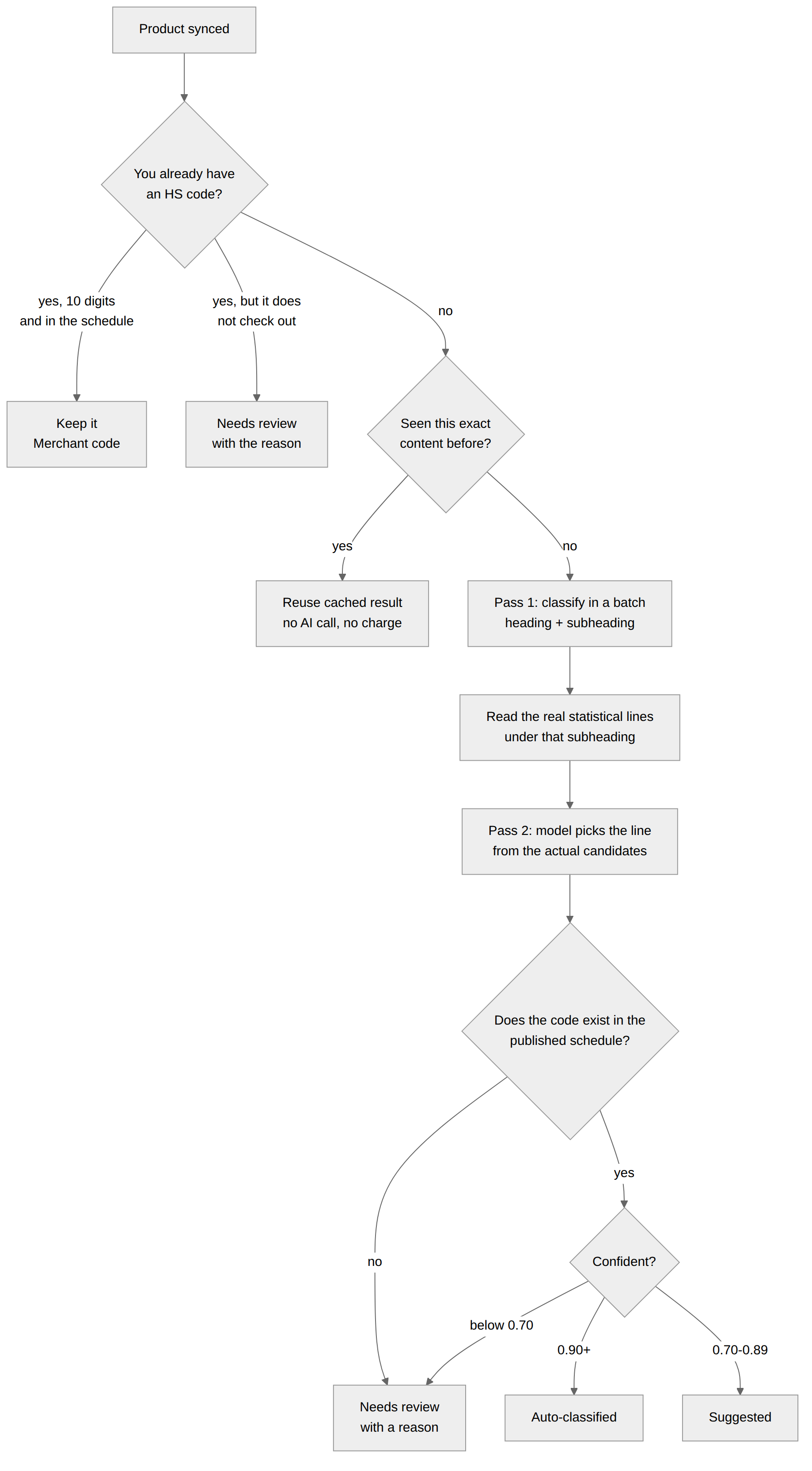
The important thing to know about how DutyLookout classifies is that it makes two separate decisions about every product, not one.
The first pass reads your product text and decides the heading and subheading — the first six digits. It does this without seeing the tariff schedule, so at that point the last four digits are whatever the model recalls.
The second pass then goes and reads the actual ten-digit statistical lines that exist under that subheading in the current schedule, hands the model that list, and asks it to pick one. The last four digits therefore come from the real schedule rather than from memory.
This is worth a paragraph because it is the error the second pass exists to
catch. A well-described snowboard once came back from the first pass as
9506.11.2000 — "Cross-country skis". Right subheading, wrong line, and it is
a genuine code, so checking that the code exists would have waved it straight
through. Only reading the sibling lines catches it.
The second pass never leaves a product worse off, but "worse off" has two different remedies:
- The pick is not a real line under that subheading, or the model returns nothing usable — the first pass's answer stands rather than being thrown away.
- The model reports that none of the lines fit — the ten-digit code is withdrawn. The row keeps the subheading and the reason the model gave, loses its code and its confidence score, and goes to Needs review for you. Better no code than a nearly-right one, and better that the product comes to you than that a suffix nobody stands behind is written to your store.
That second branch is specific to your catalogue. The free public lookup on the marketing site has no store to write to and no queue to send you to, so on a none fit it keeps the first pass's code and tells you what it is. Do not read the free tool's behaviour back into the app's.
The steps a product goes through
DutyLookout works through these in order, cheapest first, and only spends AI budget when it has to.
- Your own code. Checked before any AI call. If the product already has an HS code in Shopify that DutyLookout did not write, and it is a full ten-digit line that exists in the current schedule, it is kept and marked Merchant code. The app does not overwrite what you have already decided. If your code does not check out — a retired line, a typo, or a six- or eight-digit code, which is what Shopify's HS field usually holds — the product goes to Needs review with the reason spelled out. It is never quietly replaced with the app's own answer, and it is never parked somewhere you cannot see it.
- Cache. If another store has already classified byte-identical product content, that result is reused instantly. No AI call, no charge. Your product text is never shared — only a one-way hash of it is used to match.
- Classification (pass one). The product is bundled with up to 24 others and sent to Claude Sonnet 5, which determines the heading and subheading and explains its reasoning.
- Escalation. Anything the first pass is unsure about is sent again, bundled only with the other uncertain products, to a stronger model before anyone asks you to look at it.
- Line selection (pass two). The real statistical lines under that subheading are read from the current tariff schedule and handed back to the model, which picks the one that fits. This step is why you get a complete ten-digit code rather than a truncated or half-remembered one. Where the first pass named a subheading that no longer exists, the candidate list widens to the four-digit heading rather than giving up, and the model can correct the subheading itself from its siblings. It runs after escalation, deliberately, so that a code an escalated row only just settled on gets the same line check as everything else.
Why the code you see is always a real one
Every ten-digit code is resolved against the tariff revision that is currently published before it reaches your screen. A code that is not in that revision is refused rather than shown to you. "Currently published" is doing real work in that sentence: DutyLookout keeps every schedule revision it has ever downloaded, including ones it rejected as bad and including superseded ones that were published in their day, and only the newest published revision counts — validated against the published revision when the code is produced and again at write-back time.
There is one case where it deliberately refuses to guess. Some eight-digit tariff lines split into several ten-digit statistical lines that carry different surcharge treatment — a Section 301 program can hit some suffixes at 50% and leave the rest at 0%. Picking the numerically first one would produce a fifty-point duty error on a code that looks perfectly valid. So when an eight-digit prefix is ambiguous, DutyLookout does not pick by digit order; it sends the product to line selection, and if that cannot decide either, to you.
Two things this guarantee does not mean. It does not mean the code is the right one for your goods — that is a judgement, which is why every row carries a confidence score and a rationale for you to read. And it does not mean the code will still be current next quarter, which is what alerts are for.
No AI in the duty numbers
The model decides which code applies. Every number attached to that code is looked up, not generated: base rates come from a dated snapshot of the published schedule that carries its own revision label, surcharge programs are resolved by their effective-date windows, and the arithmetic on top is ordinary arithmetic. Price the same product twice against the same snapshot and you get the same figure. See Duty estimates for what the stack contains and what it excludes.
Which model does what
Your catalogue is classified by Claude Sonnet 5 — the same model for the first pass, for the line-selection pass, and for anything escalated out of either.
The free public lookup on the marketing site is a different path: it runs on Claude Haiku 4.5 from end to end, which is faster and much cheaper to give away. That includes the retry for a description Haiku could not place first time — the free tool never reaches for the bigger model, it retries with the same one. So treat the free tool as a preview of the format and the reasoning rather than a preview of the exact code you will get once installed, and expect the gap to be widest on exactly the products that are hardest to describe. See the FAQ for what the free tool does and does not promise.
Statuses
| Status | Confidence | What it means | What to do |
|---|---|---|---|
| Auto-classified | 0.90+ | Named the product almost unambiguously | Spot-check, then approve |
| Suggested | 0.70–0.89 | Sound reasoning, some judgement involved | Read the rationale, then approve or override |
| Needs review | below 0.70 | Genuinely ambiguous, or the data was too thin | Decide yourself |
| Merchant code | — | Your existing code, untouched | Nothing |
Confidence describes how well the product data supports the code, not how likely you are to pass an audit. A 0.95 on a well-described snowboard means the description made the answer obvious. A 0.35 on a gift card means the product is not really merchandise and no code fits well.
Why every product gets a reason
Every row carries a written rationale — the deciding factor, not a restatement of the title:
"Product explicitly identified as a snowboard; specific statistical line for snowboards applies."
"Paraffin-based synthetic hydrocarbon wax; the polyethylene-glycol line does not apply, so the residual line is correct."
"Physical gift cards not clearly goods; no line fits well."
That last one is deliberate. When DutyLookout cannot place a product it says so and explains why, rather than showing you a blank row. You will never see a result with no explanation. If a product genuinely defeats the classifier, the row tells you exactly that and what would help:
"We could not determine a tariff code for this product automatically. Add its materials and a fuller description then re-sync, or set the code manually."
Getting better results
The classifier can only work from what your product data says. In rough order of impact:
- Write a real description. Material, construction, and what the thing is for. "The perfect gift! Ships fast." tells a classifier nothing; "Poplar and birch wood core, triaxial fibreglass laminate, sintered polyethylene base, steel edges" places it immediately.
- State the material explicitly when it is not obvious from the description. Customs classification turns on material more often than on function.
- Set the product type. A one-word type is a strong hint.
- Do not rely on the title alone. Marketing titles are written for shoppers, not customs officers.
A product with a bare title will still be classified, but expect Needs review and a rationale saying the data was thin. That is the app reporting the confidence the data actually supports rather than inventing a code to fill the row.